How to Use AI to Respond to Reviews at Scale: A Complete Guide to Automated Review Management

How to use AI review responses safely: what to automate by star rating, how to brief the AI on your brand voice, and a five-point check for every draft.
AI can draft a decent reply to a review in seconds. It can also thank a customer for a refund you never gave, or post a cheerful "Thanks for the feedback!" under a complaint about food poisoning. Used well, AI review responses let a small team answer every review without writing each one from scratch. Used carelessly, they make a bad review worse in public.
This guide covers what to automate and what to keep a person on, how to give the AI enough context to sound like you, a five-point check for every draft, and the platform rules that still apply.
What AI is good at, and where it goes wrong
AI is genuinely useful for the slow part of replying: getting from a blank box to a first draft that picks up what the reviewer said. It keeps the tone consistent across a team and doesn't get defensive at 11pm. Where it goes wrong is predictable, so you can plan for it:
- It invents facts. A model that doesn't know what happened will still write "we've spoken to the team" or "your refund has been processed".
- It promises things. Refunds, call-backs and "this will never happen again" turn up in drafts unless you rule them out.
- It repeats private details. If the review mentions a booking, a diagnosis or a staff member, the draft may echo it back.
- It sounds like AI. The same opening, the same "thrilled", and dashes used as punctuation are the usual giveaways.
None of these is a reason to avoid AI. They are the reason to decide in advance which replies a person reads first.
Google review reply templates
20 replies you can copy and edit, from a 5-star thank-you to a fair answer to a 1-star complaint. Free, by email.
We'll email the templates from support@dinopix.com.au, then about one email a month with new review guides and Dinopix product news. Unsubscribe in one click from any email. Privacy policy
Decide what to automate, rating by rating
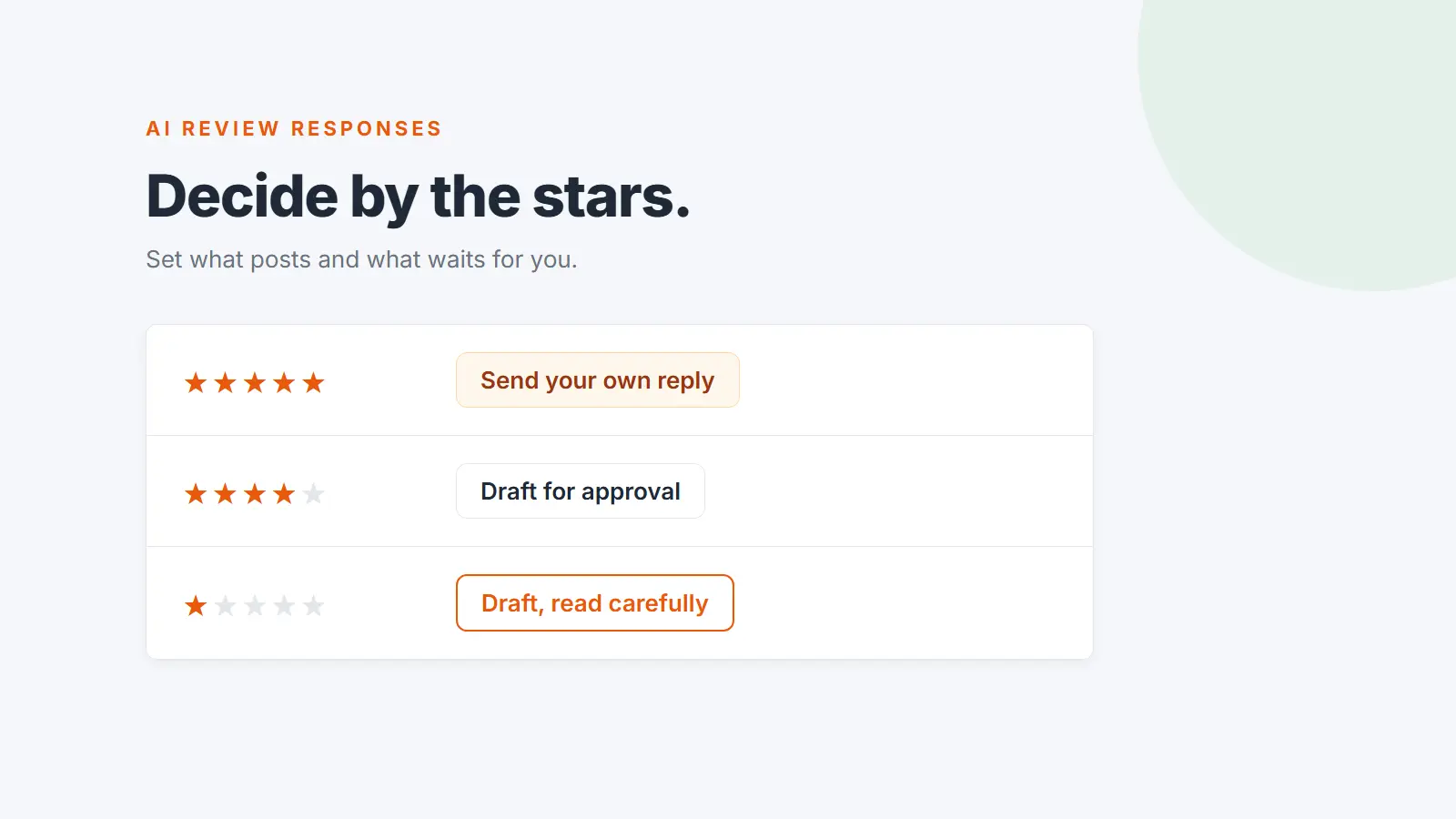
The star rating is the simplest, most reliable rule for what can go out on its own. A sensible starting point:
| Review | Sensible default | Why |
|---|---|---|
| 5 stars | Send automatically using short replies you wrote yourself, or draft for approval | Low risk, high volume |
| 4 stars | Draft for approval | Often contains a small complaint worth answering |
| 3 stars | Draft for approval | Mixed feedback is where a generic reply looks worst |
| 1 and 2 stars | Draft for approval, and read it carefully | An automated reply to an angry customer is the easiest way to make things worse |
| Stars with no text | Skip, or a one-line thanks | There's nothing specific to respond to |
| Health, safety, legal threats or a named staff member | A senior person writes or approves it | The cost of a wrong word is high |
If five-star replies go out automatically, keep them short and general, and rotate a few versions. Google's tips for review replies recommend short, conversational replies and warn against sending the same "thank you" to everyone.
Give the AI enough context to sound like you
Most bland AI replies come from bland instructions. Before you generate anything, write down:
- Tone. Professional, friendly, casual, formal or empathetic. Pick one default.
- Spelling. A café in Fremantle should apologise, not apologize.
- Who you are and how you talk. Two or three sentences is plenty: "Coastal Brew is a family-run café in Cronulla. Warm and relaxed, never salesy. Invite unhappy customers to email the owner, Mia, at hello@example.com.au."
- A never-say list. Phrases that would cost you money or trouble in public: "full refund", "our fault", "free", staff names, anything about an ongoing dispute.
- A sign-off. Google's tips suggest signing with your name or initials.
The never-say list does the most work, because it stops the most expensive mistakes even when nobody reads the draft closely.
Check every draft against five questions
- Is every fact true? Delete anything the AI couldn't know, such as what the team said or what was refunded.
- Does it promise anything you haven't agreed to? Refunds and call-backs belong in a private conversation.
- Does it reveal anything private? Order details, appointments, surnames and anything health-related come out. Google's tips say never to share a reviewer's private information.
- Does it answer the actual point? If the review was about a long wait, the reply should mention the wait.
- Would it read well under the next ten reviews? If it could be pasted under any review, make it more specific or shorter.
Here's what that looks like in practice.
Review (2 stars): "Coffee was great but we waited 35 minutes for two toasties on Sunday and nobody said anything."
AI draft: Hi Sam, thank you so much for your feedback! We're thrilled you loved the coffee. We've spoken to the kitchen team and, as an apology, your next visit is on us. This will never happen again!
After the check: Hi Sam, thanks for letting us know, and sorry about the wait on Sunday. Thirty-five minutes for two toasties is too long, and we should have told you how things were tracking. If you'd like to tell us more, email Mia at hello@example.com.au. Mia, Coastal Brew
The draft invented a conversation with the kitchen, offered a freebie in public and made a promise nobody can keep. The edit keeps the structure and drops everything that wasn't true. For the full shape of a reply to a complaint, see how to respond to negative reviews.
Running it across a team and several locations
At volume, AI review responses are an operations problem more than a writing one. Decide who approves which ratings, set a realistic response target (such as one business day), and agree where unhappy customers should be sent. Our guide to building a review response strategy your team can follow covers rules, roles and escalation, and our review response templates for every star rating and platform give you human-written starting points to compare drafts against.
Then measure four things: response rate by location (especially for one and two-star reviews), time to reply against your target, how heavily drafts are edited (heavy editing means the brand voice needs work), and how many reviewers update their review after a reply.
At scale, silence is usually a bigger risk than bad wording. When we checked the Google replies of 149 multi-location Australian businesses for the Australian Google Reviews Index, 48 had never replied, and at least 55 of the businesses we researched had a one or two-star review sitting unanswered. The sample wasn't random, so treat it as an indication only.
Platform rules still apply
Google's review help pages don't mention AI-written replies. A reply is judged the same way however it was written:
- Google checks replies before they show. They usually appear within 10 minutes but can take up to 30 days, and one that breaks Google's content policies won't be posted until you edit it.
- The reviewer is notified and can change their review after reading your reply.
- Personal information is off limits under Google's content policy.
- No incentives to change or remove a review. Google treats that as fake engagement, one more reason to keep the never-say list strict.
Australian health practitioners have an extra constraint. Ahpra treats a review that talks about symptoms, treatment or results as a testimonial, and warns that replying to reviews on third-party sites can be treated as using it to advertise. "So glad the treatment fixed your back" is exactly the risk. Have a person approve every reply and keep them non-clinical.
How Dinopix handles AI review responses
In Dinopix, click Reply on any review or comment, pick a tone next to AI Suggest (Professional, Friendly or Apologetic) and a draft appears for you to edit. Nothing is posted until you send it. AI suggestions are on every plan, with a monthly allowance that starts at 5 on Free. From Starter up you also get:
- Brand voice for each business: tone, spelling, a brand context and a never-say list. A draft containing a never-say phrase is thrown away instead of being shown to you, and dashes used as punctuation are stripped from AI replies.
- Auto-reply, off until you turn it on. For each star rating you choose: don't reply, draft for my approval, or send automatically. Drafts are emailed to you and nothing posts until you press the button on the approval page. Automatic sends use short replies you wrote yourself, never AI text, and you can add a delay, quiet hours and a daily cap.
- An Ahpra setting. Answer yes to "Registered with Ahpra?" and drafts stay non-clinical, and auto-reply waits for your approval on every rating.
Replies publish straight to Google and Judge.me reviews and to Facebook and Instagram comments. For ProductReview and Trustpilot, Dinopix can't post for you, so you save the reply, copy it and paste it on the platform. See the AI responses feature page for details and the pricing page for each plan's AI allowance.
Frequently Asked Questions
Is it OK to use AI to reply to Google reviews?
Yes. Google's review help doesn't prohibit AI-written replies. Every reply is checked against the same content policies however it was written, so what matters is that it's accurate, polite and free of private information.
Should AI replies to negative reviews post automatically?
No. Have AI draft them and a person approve them. Negative reviews are where invented facts, public promises and a cheerful tone do the most damage.
Do I need to tell customers a reply was AI-assisted?
Google's review help pages don't ask for it, and replies already show as coming from your business. The more useful test is whether someone at the business would stand behind every word, which is what the approval step is for.
Try it on your next review
Paste a review into the free review reply generator and run the draft through the five-point check. To do it across every platform and location, Dinopix Reviews drafts replies in your brand voice for you to approve.
Sources
- Google Business Profile Help, Manage customer reviews
- Google Business Profile Help, Tips to get more reviews (includes "Tips to write better review replies")
- Google Maps User Contributed Content Policy, Prohibited and restricted content
- Ahpra, Testimonials: understand the requirements
- Dinopix, Australian Google Reviews Index, October 2026
Google review reply templates
20 replies you can copy and edit, from a 5-star thank-you to a fair answer to a 1-star complaint. Free, by email.
We'll email the templates from support@dinopix.com.au, then about one email a month with new review guides and Dinopix product news. Unsubscribe in one click from any email. Privacy policy