How to See Your Google Reviews

How to see your Google reviews: find your business's reviews on Search and Maps, get alerts for new ones, check many locations, and find reviews you wrote.
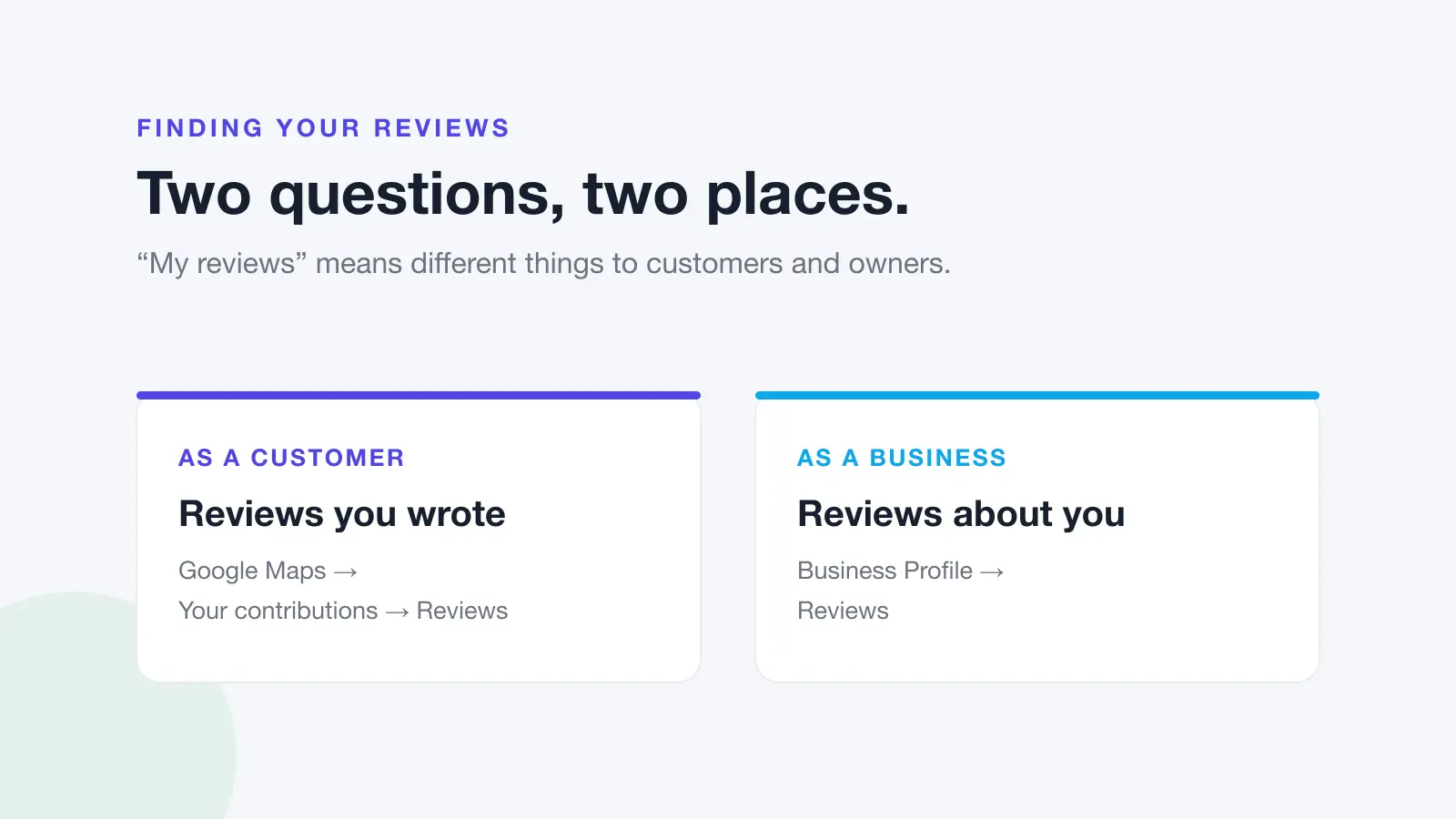
"How do I see my Google reviews?" means two different things depending on who's asking. If you run a business, you want the reviews customers have left about you, ideally the moment they arrive. If you're a customer, you want the reviews you've written yourself. They live in different places.
This guide starts with business owners: where to find your reviews on Google Search and Maps, how to get notified about new ones, and how to keep track when you have more than one location. The steps for finding reviews you've written are further down. All steps are from Google's help pages as of October 2026.
Part 1: Seeing reviews of your business
Reviews about your business are attached to your Business Profile on Google. Anyone can read them, but to manage them (reply, report, get alerts) you need to be signed in to a Google Account that owns or manages the profile.
Google Business Profile Help also notes two limits worth knowing:
- You must verify your business before you can reply. An unverified profile can still collect reviews you can read but not answer.
- Reviews aren't available everywhere. Google says reviews are only available in certain countries or regions and for certain business categories, and that availability may change.
On Google Search
- Sign in to the Google Account that manages your Business Profile.
- Search Google for your business name and city, or simply search my business.
- Your Business Profile appears with management options.
- Select Read reviews to see your reviews. Next to any review, select Reply to respond.
This is the quickest route on a computer, and it's where Google's own "read and reply to reviews" steps begin ("Go to your Business Profile, select Read reviews").
On Google Maps (computer)
- Sign in, open Google Maps and search for your business name and city.
- On your Business Profile, scroll to Reviews.
- To reply to a review, click Reply.
On your phone: the Google Maps app
If you're looking for a separate Google Business Profile app, Google's current help pages send owners to the Google Maps app instead:
- Open the Google Maps app, signed in to the right account.
- At the bottom right, tap Business.
- If you manage more than one business, tap the down arrow at the top and choose the business you want.
From there you can open your reviews and reply.
Get notified about new reviews
Checking your profile works until the week you're busy, which tends to be the week a complaint arrives. Google can tell you instead. According to Google Business Profile Help, "customer activity" notifications include alerts when customers leave new reviews or add photos, and you might receive Business Profile notifications by email, on Search or in Maps.
To manage notifications on Google Search:
- Go to your Business Profile.
- Select More, then Notifications.
- Turn each notification on or off.
To find notifications in the Google Maps app:
- Open the Google Maps app and tap Business at the bottom right.
- At the top right, tap Notifications.
Google says you may still get important updates even if you turn some notifications off. If you've claimed profiles you don't actually manage, those can generate notifications too, and Google's advice is to remove those profiles from your account.
Two practical tips: make sure review alerts go to someone who can act on them (not just the owner's personal inbox), and if several people manage the profile, agree who replies so customers don't get two answers or none. For a broader setup across platforms, see our guide to setting up review alert notifications.
Seeing reviews for many locations
Each location has its own Business Profile, and each profile has its own reviews. In Google's own tools, reading reviews means opening each location in turn: switching business in the Maps app, or going to each profile from Search.
For larger businesses, Google offers the Business Profile Manager for managing profiles in bulk. Google's bulk location management guide says businesses with 10 or more locations can add, verify and manage them in bulk, using a business group (previously called a business account) to share management of locations with several people. That makes it easier to keep information and access in order, but you still need a way to notice new reviews at every location.
That's where gaps appear. When we checked the Google replies of 149 multi-location Australian businesses for the Australian Google Reviews Index, 48 had never replied and only 39 replied consistently. The sample wasn't random and probably overstates the problem, so treat it as an indication, but it shows how easily reviews at some locations go unanswered.
If this is your situation, Dinopix can show every Google location's reviews in one list. You connect the Google account that manages your profiles once, every location it manages is found, and unreplied reviews from all of them appear together, filterable by location or group, with replies posting straight to Google. Notifications cover every business you belong to, with email alerts for new reviews and an urgent email when a review lands at or below the star rating you choose.
What you can and can't see
| You want to see | Where | Possible? |
|---|---|---|
| Reviews about your business | Your Business Profile on Search or Maps, then Reviews | Yes |
| The reviewer's name | On the review | Yes. Google Maps Help says reviews are public and show the name on the reviewer's About me page |
| The reviewer's email or phone number | Not shown on reviews | No |
| A review removed for breaking Google's policies | Not shown | No. Google says reviews removed for policy violations won't be restored |
| The progress of a review you reported | Google's Reviews Management Tool | Yes, along with a one-time appeal if it isn't removed |
| Reviews on a profile you haven't verified | Your public profile | You can read them, but you can't reply |
Why a review you expected isn't showing
Google Business Profile Help lists several reasons a review might be missing or delayed:
- Reviews are checked against Google's policies first, which can take a few days.
- If you recently merged Business Profiles, reviews from both can take a few days to display.
- Customers on older phones or software might have trouble posting, and Google suggests they update the Maps app.
- Reviews removed for policy violations won't be restored.
- Google might temporarily disable reviews for some profiles or business categories.
On the customer side, the most common cause is simpler: the review was posted against a different branch of the same business, or from a different account than the customer thinks. For the full checklist, see why your Google reviews aren't showing.
Once you can see your reviews, the next step is answering them. Our guide on how to reply to Google reviews covers the mechanics, and how to respond to negative reviews covers the hard ones.
Google review reply templates
20 replies you can copy and edit, from a 5-star thank-you to a fair answer to a 1-star complaint. Free, by email.
We'll email the templates from support@dinopix.com.au, then about one email a month with new review guides and Dinopix product news. Unsubscribe in one click from any email. Privacy policy
Part 2: Seeing reviews you've written
If you're looking for reviews you've posted yourself, they're in your Google Maps contributions. Make sure you're signed in to the account you used to write them.
On a computer
- Open Google Maps.
- At the top left, click Menu.
- Click Your contributions.
- Click Reviews to see the places you've reviewed.
To edit or delete one, click More next to the review and choose Edit review or Delete review.
In the Google Maps app (Android, iPhone and iPad)
- Open the Google Maps app.
- Tap Contribute.
- Tap View your profile to see the places you've reviewed.
- To edit or delete a review, scroll and tap See all reviews, tap More next to the review, then choose Edit review or Delete review.
If you edit a review, Google shows the date of your latest edit as the review's date. More on that in can you edit a Google review?.
Can't find a review you know you wrote? Check which account you're signed in to. Reviewing from a personal account and then looking from a work account (or the other way round) is a common mix-up. If it's definitely the right account, the review may have been removed for breaking Google's policies, which Google says it doesn't reverse.
Frequently Asked Questions
How do you see the reviews on your Google Business Profile?
Sign in to the Google Account that manages the profile, search Google for your business name and city (or search "my business"), then select Read reviews. You can also search for your business in Google Maps and scroll to Reviews, or open the Google Maps app and tap Business.
How do you get notified when someone leaves a Google review?
Google Business Profile notifications include alerts when customers leave new reviews. On Search, go to your Business Profile, select More, then Notifications, and turn on the ones you want. Google says these can arrive by email, on Search or in Maps.
Why can't you reply to your Google reviews?
Google requires a verified Business Profile before you can reply. Also check that you're signed in to an account that owns or manages the profile. If both are fine and the option still isn't there, check whether reviews are available for your business category and region.
How do you see Google reviews for all your locations at once?
In Google's own tools, each location's reviews are read from its own profile, so you switch between them. Businesses with 10 or more locations can use Business Profile Manager to manage profiles in bulk. To see every location's reviews in one list, a review management tool that connects to all your profiles is the practical option.
How do you find all the Google reviews you've written?
On a computer, open Google Maps, click Menu, then Your contributions, then Reviews. In the Google Maps app, tap Contribute, then View your profile. If a review is missing, check you're signed in to the account you used to post it.
Can you see reviews that Google removed?
No. Google says reviews removed for policy violations won't be restored, and they aren't shown on your profile. If you reported a review yourself, you can check that report's status in the Reviews Management Tool.
Never miss a review at any location
Finding your reviews is the easy part. Seeing every new one quickly, at every location, is what keeps customers from waiting days for an answer. Dinopix Reviews brings every Google location's reviews into one list, with alerts for the ones that need you first.
Sources
- Google Business Profile Help, Manage customer reviews
- Google Business Profile Help, Find your business on Google
- Google Business Profile Help, Manage your notifications
- Google Business Profile Help, Bulk location management overview
- Google Business Profile Help, Get started with Google Business Profile
- Google Business Profile Help, About missing or delayed reviews
- Google Business Profile Help, Report inappropriate reviews on your Business Profile
- Google Maps Help, Add, edit, or delete Google Maps reviews and ratings
- Dinopix, Australian Google Reviews Index, October 2026
Google review reply templates
20 replies you can copy and edit, from a 5-star thank-you to a fair answer to a 1-star complaint. Free, by email.
We'll email the templates from support@dinopix.com.au, then about one email a month with new review guides and Dinopix product news. Unsubscribe in one click from any email. Privacy policy